Muah.Life · Digital rewards guide
Muah AI rewards on Muah.Life
Updated · Muah.Life rewards guide
Use this guide to understand the digital rewards listed in the Muah.Life shop: a short Muah AI VIP upgrade and account usage resets. Check the current token cost, your linked account, and the membership requirement before redeeming.
Muah AI is an AI companion platform for adults. It lets you create fictional characters and explore text conversations, voice, generated photos, and video. Feature access and limits vary by account; a reward applies only to the benefit described below.
01 · Choose a reward
Current digital rewards and token costs
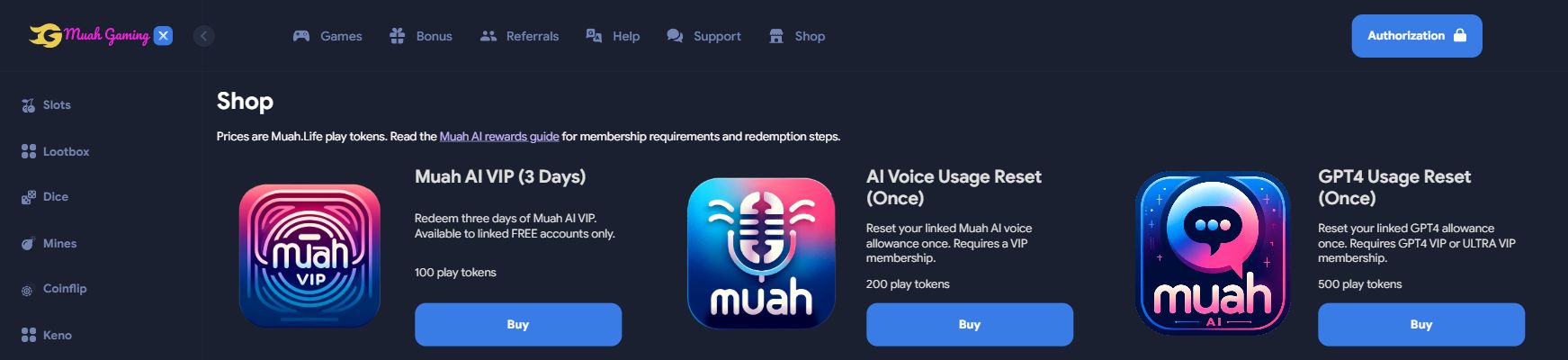
Current token costs and membership requirements are listed below. Review the shop price before confirming a redemption. These are Muah.Life play tokens, with zero cash value. They are not US dollars, cryptocurrency, or the text tokens used by an AI model.
| Reward | Cost | Eligible Muah AI membership |
|---|---|---|
| Muah AI VIP (3 Days) Three days of Muah AI VIP for an eligible free account. | 100 play tokens | FREE membership only. This reward does not extend a paid membership. |
| AI Voice Usage Reset (Once) One reset of the linked account's AI voice usage allowance. | 200 play tokens | VIP, GPT4 VIP, ULTRA VIP, or 500 ULTRA VIP membership. |
| GPT4 Usage Reset (Once) One reset of the linked account's GPT4 usage allowance. | 500 play tokens | GPT4 VIP or ULTRA VIP membership. Other tiers are not currently eligible. |
The shop also lists physical items. Shipping and physical-item fulfillment are outside the scope of this guide.
02 · Check the right account
Account eligibility before checkout
- Use the linked Muah AI account. Rewards target the Muah AI account associated with your Muah.Life sign-in. An email address alone does not confirm that the intended accounts are linked. If you already access Muah.Life from the rewards area in Muah AI, start there and continue with that account.
- Check your Muah AI membership. Review the plan shown in your Muah AI account and compare it with the requirement for your chosen reward. If checkout does not recognize your linked account or reports an unexpected membership, contact support before trying again.
- Check your play-token balance. Make sure the Muah.Life balance selected for checkout covers the reward's current price. Review the amount in the shop before confirming.
- Review the specific benefit. A usage reset concerns the named allowance. It does not upgrade your membership or promise access to every Muah AI feature.
For context on the available interactions, read the Muah AI companion feature guide. The controls and membership details in your Muah AI account show what is available to you.
03 · Redeem carefully
How to redeem a Muah AI reward
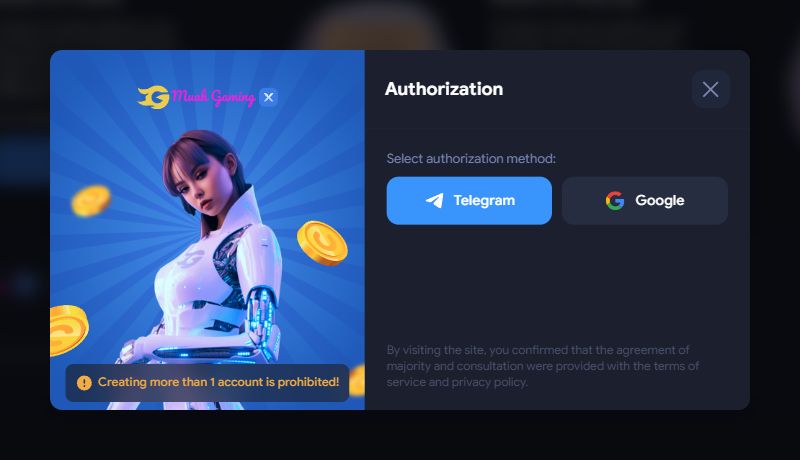
Sign in with the linked account
Use your established Muah.Life sign-in. If you use Muah AI's rewards area, open Muah.Life from that area so you continue the same account connection.
Check membership and balance
Check your plan in Muah AI, then make sure your selected Muah.Life play-token balance covers the reward's current price. Eligible accounts can review daily credits on Bonus.
Review the shop listing
Open the Muah.Life shop, choose the eligible digital reward, and select Buy. Read the confirmation before approving the token cost.
Submit once and check the result
Wait for the checkout response. Then open the linked Muah AI account and check its membership or the relevant usage allowance. Confirm that the benefit arrived before making another attempt.
04 · Verify the benefit
Delivery status and troubleshooting
Check the benefit in your Muah AI account
The shop processes digital reward requests during checkout. No guaranteed delivery window is published. After confirmation, refresh the linked Muah AI account and check its membership or relevant usage allowance. If the benefit is missing, contact support before making another attempt.
Your membership is not recognized
Check that you are signed in to the intended linked account. Pause checkout if it reports an unexpected membership or says that the Muah AI account is not registered.
The reward is ineligible
Match your current membership against the reward table. The three-day VIP reward is for free members. The voice and GPT4 resets have separate membership requirements.
Tokens were deducted but nothing changed
Keep the reward name, redemption time, token amount, and a screenshot of the checkout result. Contact Muah.Life support with these details before retrying.
The interface still shows the old state
Check the same linked Muah AI account and reload its page. If the membership or relevant usage limit still has not changed, ask support to review the redemption.
Never share your password or payment keys in a support request. Avoid duplicate attempts while a previous redemption is being checked.
Common questions about Muah AI rewards
Can an existing VIP member redeem the three-day VIP reward?
No. The current reward requires a linked account recognized as FREE. It does not add three days to an existing paid plan.
Is a voice reset available to free accounts?
No. The current voice reward requires VIP, GPT4 VIP, ULTRA VIP, or 500 ULTRA VIP membership.
Does the GPT4 reset support every higher tier?
The current checkout accepts GPT4 VIP and ULTRA VIP for this reward. Do not assume another tier qualifies based on its name; review the table before redeeming.
Are play tokens the same as cryptocurrency or cash?
No. Muah.Life play tokens have zero cash value. Reward prices are token amounts, and tokens cannot be withdrawn as cash or cryptocurrency.
Does redeeming a reward create a Muah AI account?
No. Use an existing linked Muah AI account and check the recognized membership before checkout. Matching email addresses alone do not verify the connection.
Where can I learn how to use Muah AI?
The Muah AI user guide explains account controls, character settings, voice, media tools, usage limits, and troubleshooting.